Optional interactive illustration
Pablo’s interactive polargraph illustration
Requirements: The interactive pen controls, live chain readouts, and drawing animation require JavaScript and SVG support in a modern browser. No account, plug-in, or installation is needed. Use a mouse, touch, or the keyboard controls described below.
How Pablo works
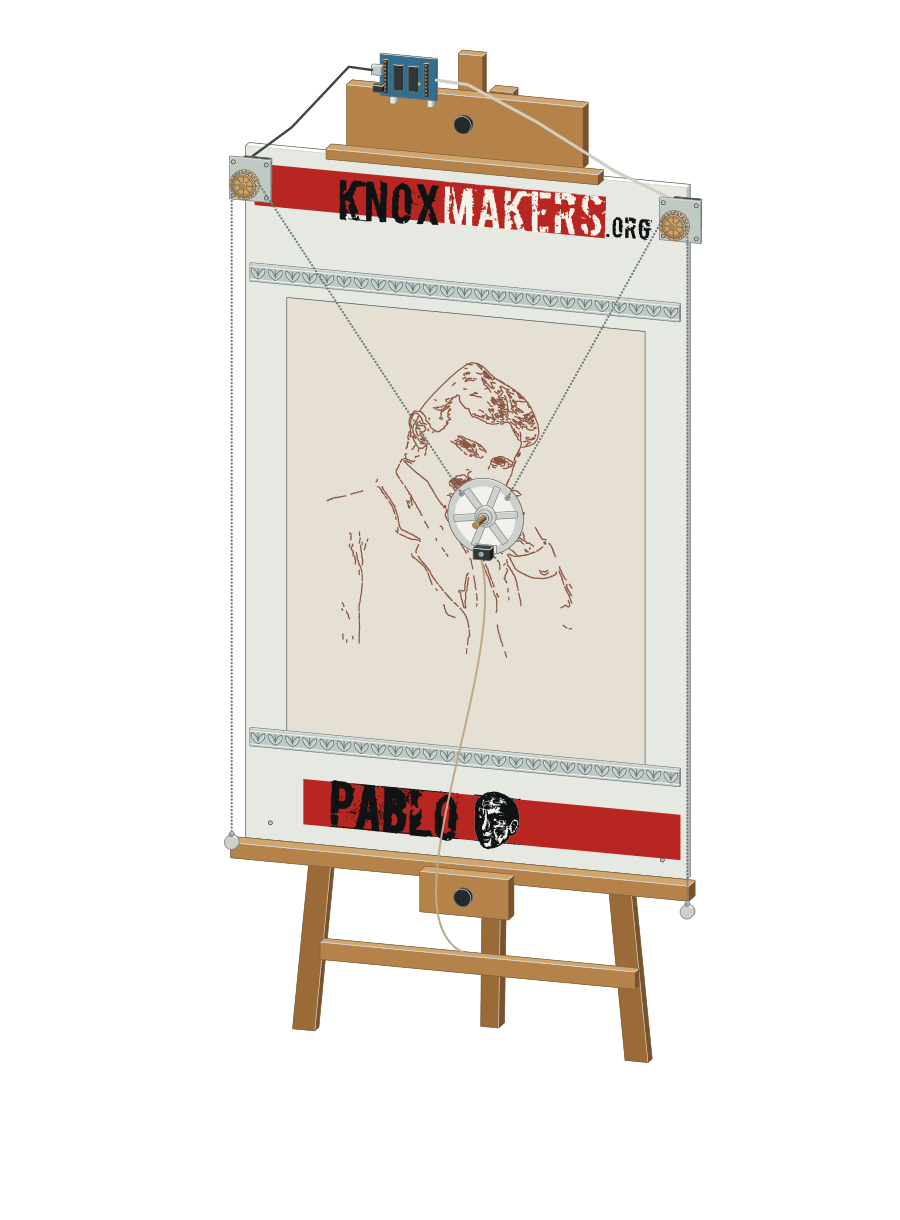
Pablo positions a pen by changing the lengths of two chains, one running from each upper corner of the drawing board to the pen holder. Two motors feed the chains in or out. Working together, they move the pen across the paper. Counterweights keep the chains under tension, rising as more chain feeds toward the pen. A small servo lifts the pen between strokes so it can move without leaving a connecting line.

What the simulation shows
Select Draw Tesla to watch the pen trace a portrait of Nikola Tesla in 705 separate strokes. The chains, counterweights, and length readouts change as it draws. Travel between strokes leaves no ink.
You can also move the pen by dragging on the paper, using the position sliders, or focusing the drawing board and pressing the arrow keys. Hold Shift for larger steps; press Space to start or pause drawing. Clear removes the drawing, and Reset restores the completed portrait and starting pen position.
With reduced motion enabled, Draw Tesla displays the completed portrait immediately. The simulation illustrates the mechanism rather than reproducing Pablo’s exact dimensions or drawing speed.
The Tesla portrait was traced from a photograph of Nikola Tesla (opens in a new tab) (1856-1943) at age 40, available through Wikimedia Commons (opens in a new tab), where it is listed as public domain.